> For the complete documentation index, see [llms.txt](https://atlas.anywhere.now/llms.txt). Markdown versions of documentation pages are available by appending `.md` to page URLs; this page is available as [Markdown](https://atlas.anywhere.now/use/monitor-and-report/power-bi-template/power-bi-template-measurements.md).
# Power BI Template measurements and flows
Understand how the Power BI Template measures dialogue flows.
The Power BI Template is based on historical Call Detail Records (CDR) data and reports on handled sessions. Conversations that are still waiting or not yet picked up are not included until they are handled.
{% hint style="info" %}
This page applies to existing or transitional deployments that still use historical CDR data. New Dialogue Cloud Neo customers do not receive a customer CDR database and use Dialogue Insights instead.
{% endhint %}
Use this reference when you need to understand which part of a dialogue flow contributes to a measurement in the Power BI Template.
{% hint style="info" %}
In Dialogue Cloud V3 reporting, WhatsApp, WebChat, email, SMS, and other text-based dialogues are grouped under the **Text** modality. Use skills or other report filters to distinguish text channels.
{% endhint %}
## Inbound call
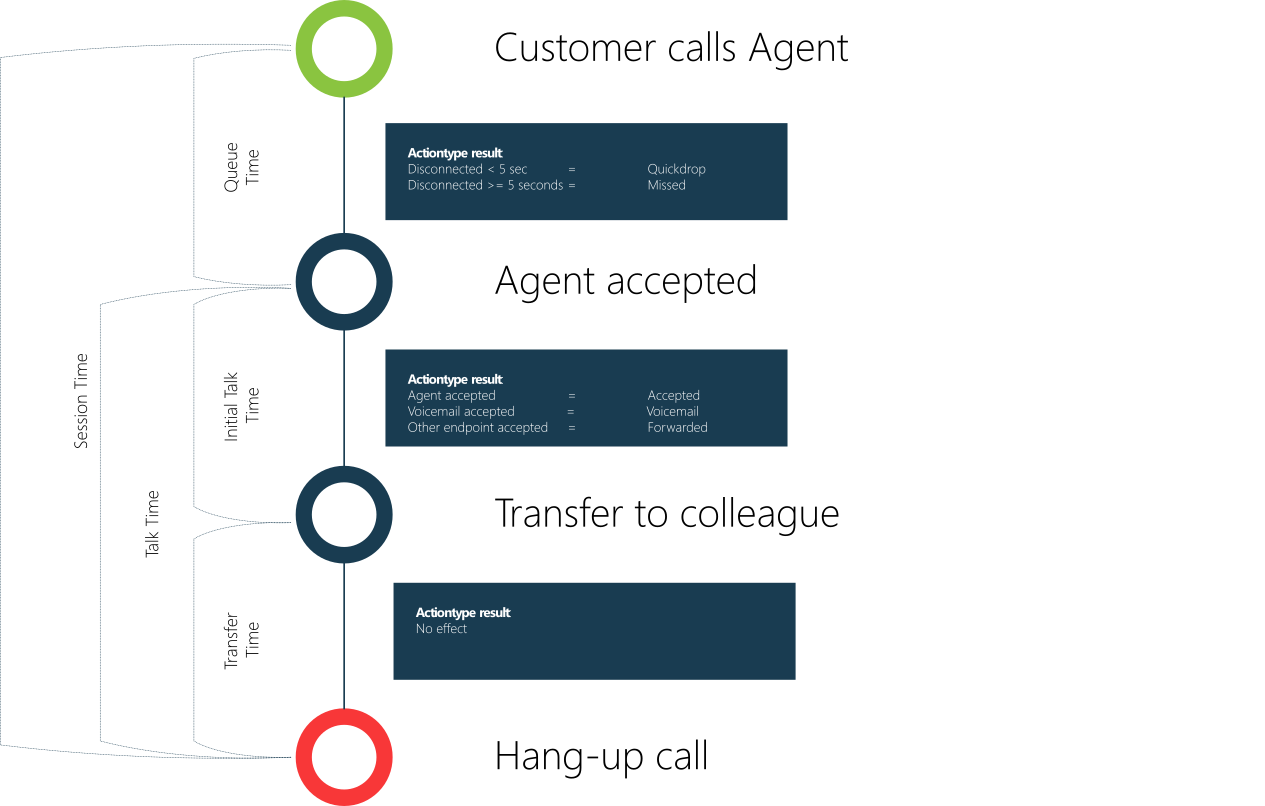
An inbound call is a call from a customer into a UCC. Data is recorded from the moment the UCC receives the call until the customer hangs up.
| Type | Value |
| ----------- | ------------------- |
| Dialogue | Inbound |
| Modality | Call |
| Action type | See the flow image. |
## Inbound text
Inbound text is a text-based dialogue that is passed through Dialogue Manager by a Dialogue Provider.
Text channels include:
* Email through the Email Dialogue Provider.
* WhatsApp or SMS through the WhatsApp and SMS Dialogue Provider.
* WebChat through WebChat for WebAgent.
* Generic text through the Generic Dialogue Provider.
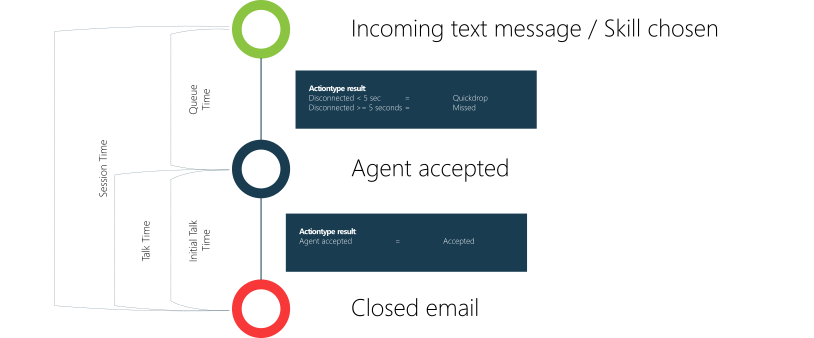
When a new message is received, an inbound text session starts. The session can end when the agent selects **Handled** in WebAgent, when the customer selects **Close Chat** in WebChat, or when the WebChat Time to Live expires.
If a follow-up message is sent after the session is closed, a new text session is created. If the session is still open, whether queued or connected, the follow-up message is added to the existing text session.
Outside business hours or during holidays, inbound text can remain queued until processing starts. This can shift when the session becomes visible in reporting and can affect the reported start time.
| Type | Value |
| ----------- | ------------------- |
| Dialogue | Inbound |
| Modality | Text |
| Action type | See the flow image. |
## Outbound text
When an agent starts a new email session in WebAgent, an outbound text session starts. The outbound text session ends when the agent selects **Handled** in WebAgent. If the customer responds after the agent closes the session, the response starts an inbound text session.
| Type | Value |
| ----------- | ------------------- |
| Dialogue | Outbound |
| Modality | Text |
| Action type | See the flow image. |
## Direct call
A direct call is a conversation from a customer to an agent that is intercepted by the Interceptor. The session starts recording when the UCC receives the intercepted call and stops when the customer hangs up.
| Type | Value |
| ----------- | ------------------- |
| Dialogue | Direct |
| Modality | Call |
| Action type | See the flow image. |
## Outbound call
An outbound call is a conversation from an agent to a callee that is intercepted by the Interceptor.
| Type | Value |
| ----------- | ------------------- |
| Dialogue | Outbound |
| Modality | Call |
| Action type | See the flow image. |
## Outbound Campaign Dialer
An outbound Campaign Dialer conversation is a session started by the Campaign Dialer.
| Type | Value |
| ----------- | ------------------- |
| Dialogue | Outbound |
| Modality | Campaign Dialer |
| Action type | See the flow image. |
## Outbound Direct Dialer
An outbound Direct Dialer conversation is a session started by the Direct Call Interceptor in Snapper or WebAgent.
| Type | Value |
| ----------- | ------------------- |
| Dialogue | Outbound |
| Modality | Direct Dialer |
| Action type | See the flow image. |
## Outbound Autonomous Dialer
An outbound Autonomous Dialer conversation is a session started by the Autonomous Dialer.
| Type | Value |
| ----------- | ------------------- |
| Dialogue | Outbound |
| Modality | Autonomous Dialer |
| Action type | See the flow image. |
## Agent hunt time
A hunt is when the UCC contacts an agent for a conversation and the agent needs to accept it.
Dialogue types that use hunting include:
* Inbound call.
* Inbound text.
* Direct call.
* Outbound Campaign Dialer.
* Outbound Direct Dialer.
* Outbound Autonomous Dialer, if the conversation continues in a skill.
## Agent discharge
Discharge time is the time spent wrapping up the conversation.
## Hold time
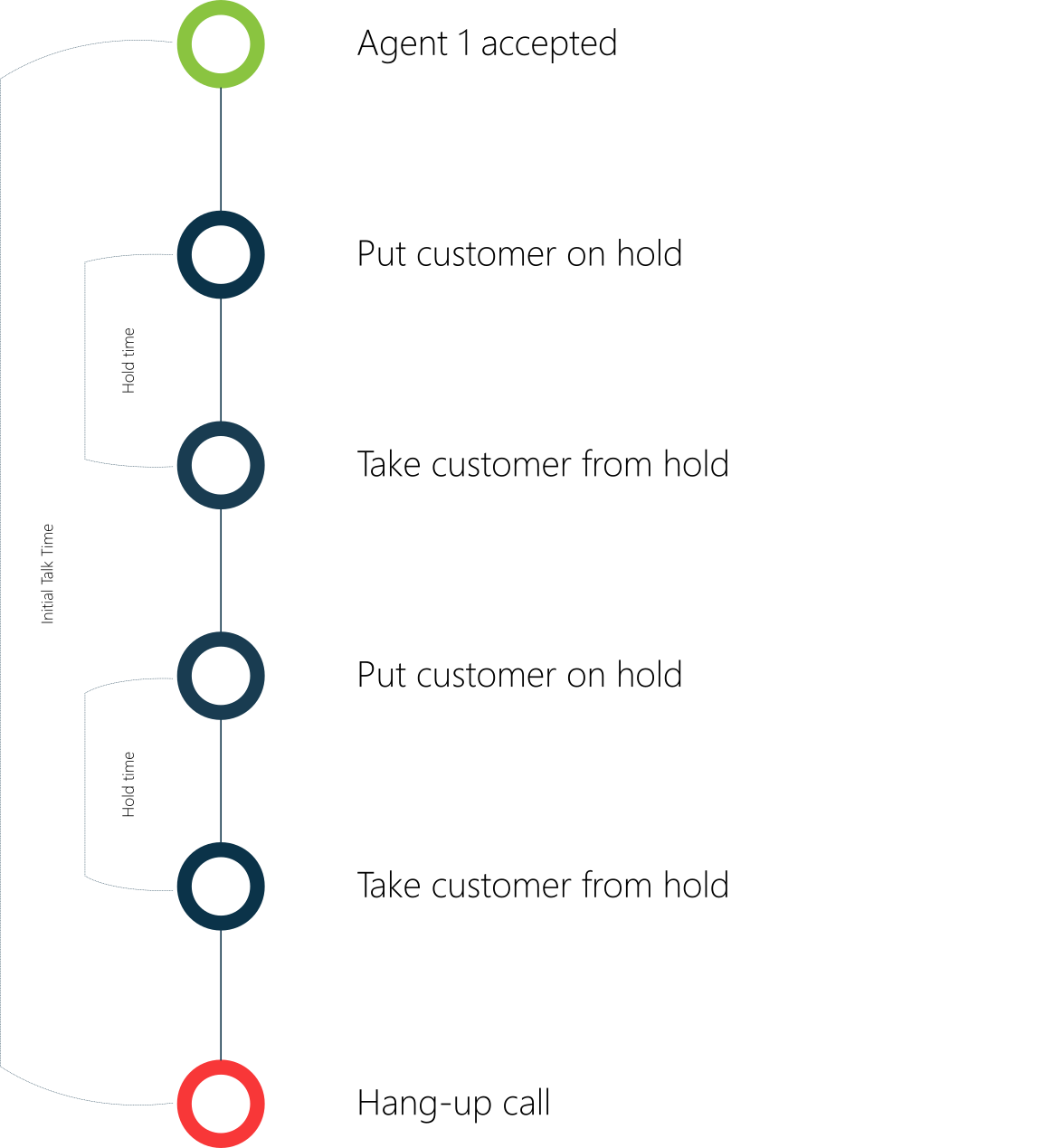
Hold time is the total time the customer has been placed on hold during a conversation.
---
# Agent Instructions
This documentation is published with GitBook. GitBook is the documentation platform designed so that both humans and AI agents can read, navigate, and reason over technical content effectively. Learn more at gitbook.com.
## Querying This Documentation
If you need additional information that is not directly available in this page, you can query the documentation by asking a question.
Perform an HTTP GET request on the following URL with the `ask` and `goal` query parameters:
```
GET https://atlas.anywhere.now/use/monitor-and-report/power-bi-template/power-bi-template-measurements.md?ask=&goal=
```
`ask` is the immediate question: it should be specific, self-contained, and written in natural language.
`goal` is what the user is ultimately trying to achieve, the reason they need the answer. Sharing it helps GitBook give you a better, more relevant answer. A goal is most helpful when it describes the outcome the user wants rather than restating the question. For example, with `ask=how do I create an API token`, a goal like `automate deployments from our CI pipeline` lets GitBook tailor the answer to that use case.
The response will contain a direct answer to the question and relevant excerpts and sources from the documentation.
Use this mechanism when the answer is not explicitly present in the current page, you need clarification or additional context, or you want to retrieve related documentation sections.