> For the complete documentation index, see [llms.txt](https://atlas.anywhere.now/llms.txt). Markdown versions of documentation pages are available by appending `.md` to page URLs; this page is available as [Markdown](https://atlas.anywhere.now/use/existing-dialogue-cloud-neo-connect-apps/snapper/snapper-dashboard-and-statistics.md).
# Snapper dashboard and statistics
Understand Snapper dashboard cards, call overview, and statistics.
The Snapper dashboard gives agents and supervisors a quick view of what is happening in the selected UCC (Unified Contact Center).
## Dashboard components
The dashboard can include these components, depending on your role and configuration.
| Component | What it shows |
| ----------------------- | ------------------------------------------------------------------------------------------------ |
| **DCI** | The outbound dial pad and Call on Behalf entry point when Direct Call Interceptor is configured. |
| **UCC switch** | The UCCs available to you and your role for each UCC. |
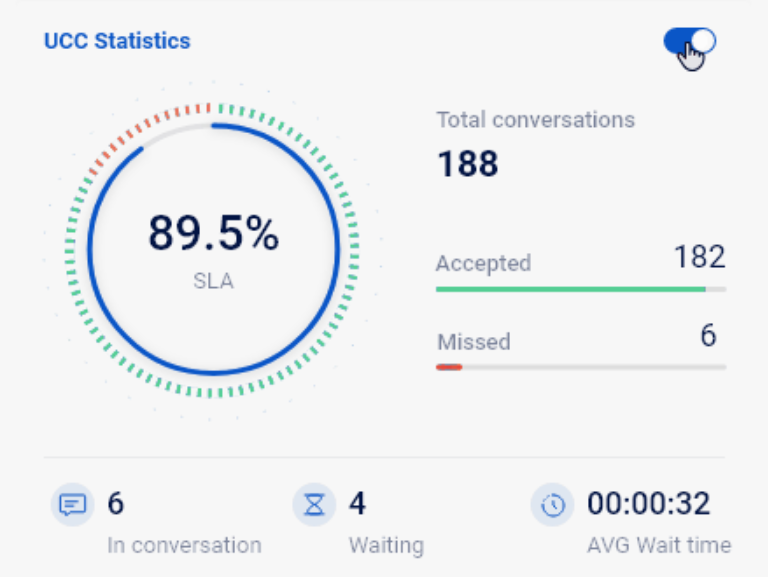
| **Call statistics** | Today's statistics for the selected UCC. |
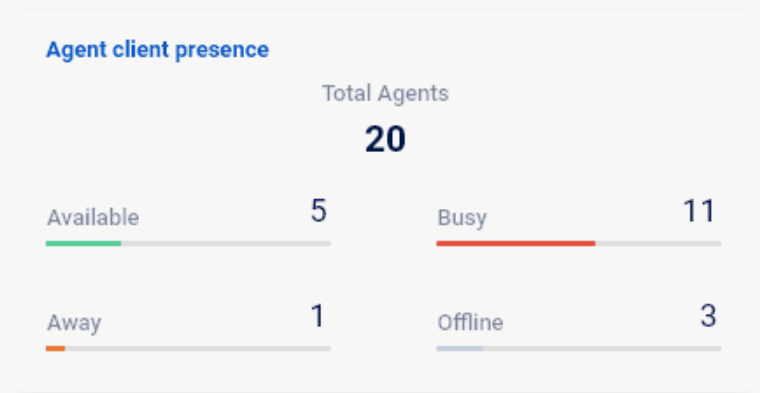
| **Agent statistics** | A quick overview of active agents in the selected UCC. |
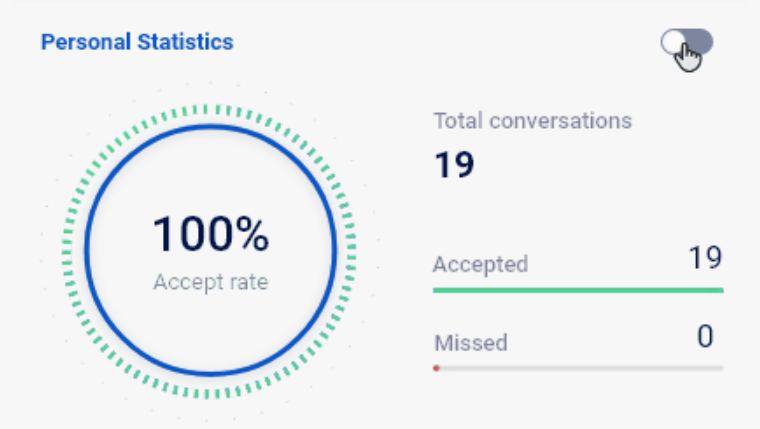
| **Personal statistics** | Your personal calls for today compared with UCC activity. |
## Call statistics
The call statistics card shows today's activity for the selected UCC. Values can be affected by Snapper settings.
| Item | Description |
| -------------------- | ------------------------------------------------------------------------------------------- |
| **SLA** | Percentage based on the SLA formula configured for Snapper. |
| **Accepted** | Number of accepted conversations today. |
| **Missed** | Number of missed conversations today with a skill. |
| **In conversations** | Total conversations connected to an agent. |
| **Waiting** | Total conversations waiting in the queue. |
| **Queue Time** | Average or longest queue time of accepted conversations, depending on the selected setting. |
{% hint style="warning" %}
Snapper statistics use a simplified source compared with Dialogue Intelligence and reporting. Values may not match one-to-one across tools.
{% endhint %}
## Agent statistics
Agent statistics show a quick overview of agents in the UCC.
| Item | Description |
| ---------------- | ------------------------------------------------------------------------------ |
| **Total Agents** | Informal agents plus logged-in formal agents. |
| **Available** | Agents who are available, not in discharge duration, and have an audio device. |
| **Busy** | Agents who are busy and have an audio device. |
| **Away** | Agents who are away and have an audio device. |
| **Offline** | Agents who are offline, and agents in discharge duration. |
## Personal statistics
Personal statistics show your personal calls today and help compare your performance with UCC activity.
| Item | Description |
| ------------ | -------------------------------------------------------- |
| **SLA** | Your handle rate for today: accepted divided by offered. |
| **Accepted** | Calls you accepted today. |
| **Missed** | Calls you missed today. |
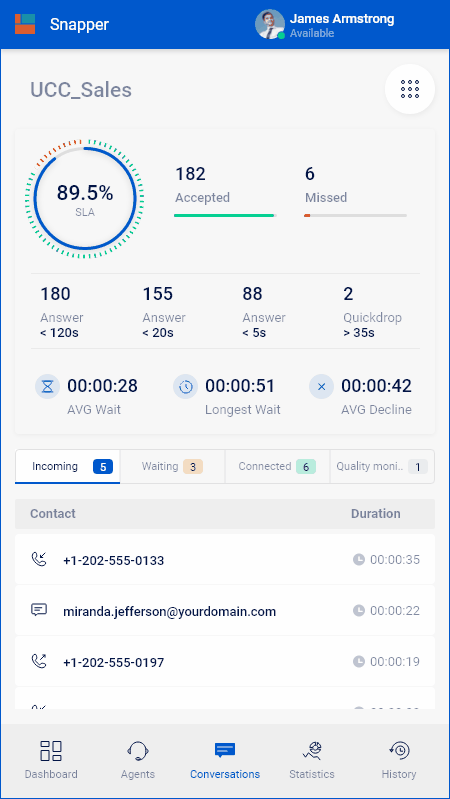
## Calls overview
The calls overview shows call statistics and conversations connected to the selected UCC.
### Call statistic details
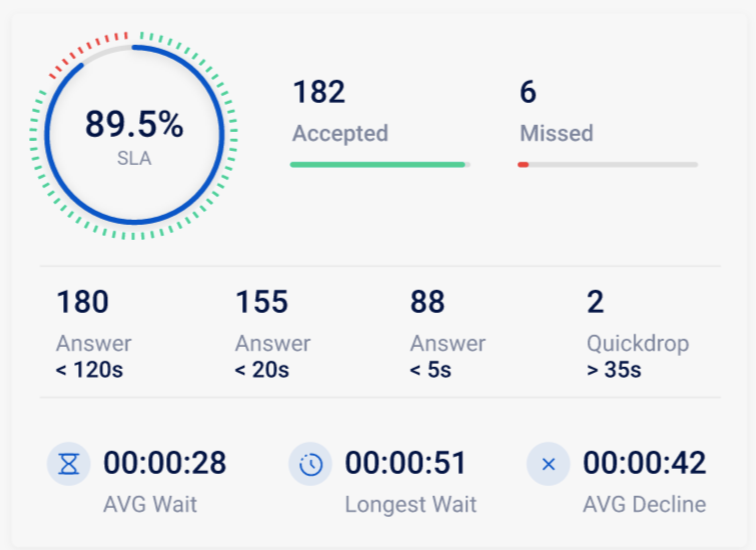
| Item | Description |
| --------------------- | -------------------------------------------------------------------------------------------------------- |
| **SLA** | Conversations answered within the configured SLA threshold divided by accepted and missed conversations. |
| **Accepted** | Number of accepted conversations today. |
| **Missed** | Number of missed conversations today with a skill. |
| **Answer in 120 s** | Number of accepted conversations today with a queue time shorter than 2 minutes. |
| **Answer in 20 s** | Number of accepted conversations today with a queue time shorter than 20 seconds. |
| **Quickdrop in 5 s** | Number of missed conversations today with a queue time shorter than 5 seconds. |
| **Average Wait Time** | Average queue time of accepted conversations. |
| **Longest wait** | Longest queue time of accepted conversations today. |
| **AVG Decline** | Average queue time of missed conversations. |
### Dialogue details
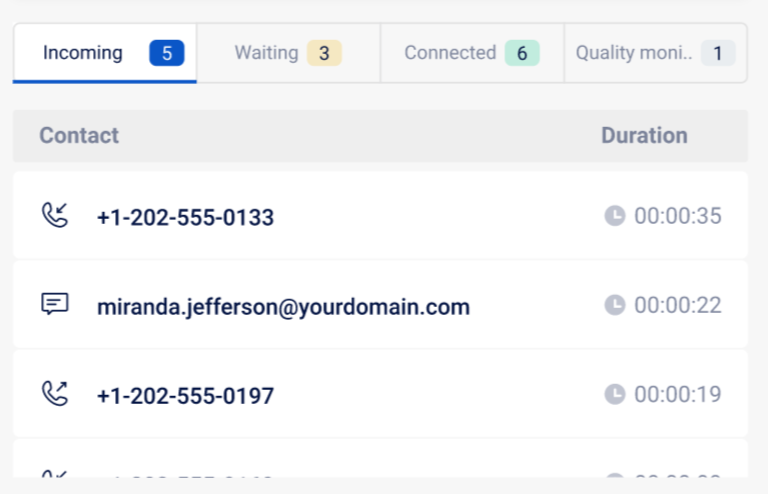
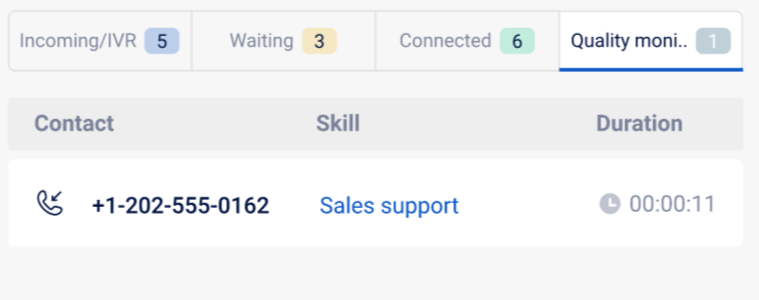
Dialogue detail tabs can show conversations in these states:
* **Incoming / IVR**: audio, chat, and Autonomous Dialer in IVR.
* **Waiting**: audio, chat, email, Campaign Dialer, and Autonomous Dialer in queue.
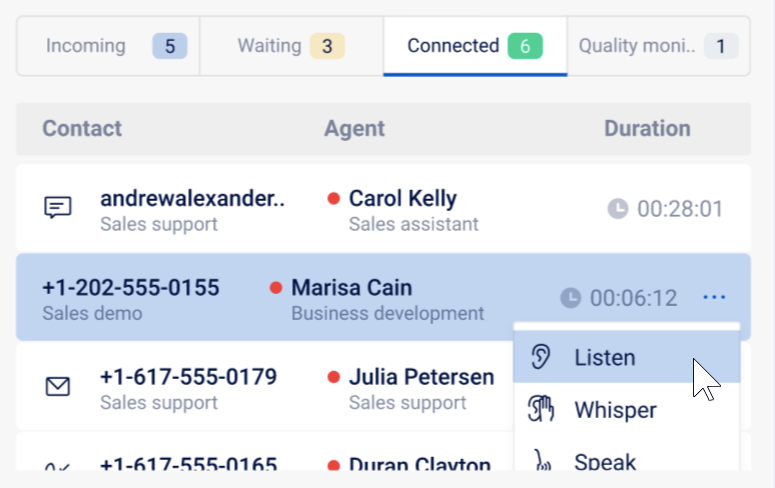
* **Connected**: audio, chat, email, Campaign Dialer, and Autonomous Dialer connected.
* **Quality**: audio, chat, email, Campaign Dialer, and Autonomous Dialer in quality monitoring.
For waiting calls, supervisors can use **Take** to take the call directly from the queue when this action is available.
Supervisor actions for connected calls can include:
| Action | What it does |
| ------------ | ----------------------------------------------------------------------------------------- |
| **Listen** | Join silently. Neither the agent nor the customer can hear the supervisor. |
| **Whisper** | Join in whisper mode. The agent can hear the supervisor, but the customer cannot. |
| **Speak** | Join in talk mode. The agent and customer can hear the supervisor. |
| **TakeOver** | Take over the conversation instead of the agent. The agent is muted but can still listen. |
{% hint style="info" %}
In TakeOver mode, the supervisor becomes the primary owner of the conversation. If the supervisor ends the call in this mode, the conversation ends for the agent and customer. If the supervisor ends the call while using Listen, Whisper, or Speak, only the supervisor leaves the call.
{% endhint %}
### Filter dialogue details
Use the filters in each dialogue detail tab to show only the columns and conversations you need.
## Advanced statistics
The advanced statistics view gives more insight into UCC statistics and lets users compare personal performance with queue performance.
| Item | Description |
| -------------------- | ------------------------------------------------------------------------------------------------------------------------------------------ |
| **Personal / Queue** | Shows whether the row is about personal performance or queue performance. |
| **Modality** | Shows whether the row is about calls, chats, emails, or another modality. |
| **Skill** | Name of the skill the row relates to. |
| **Active time** | For a queue, the sum of active time for agents associated with a skill. For a person, active time for the specific agent within the skill. |
| **Accepted** | Accepted conversations within the skill. |
| **Missed** | Missed conversations or hunts within the skill. |
| **AHT** | Initial talk time plus discharge duration. |
| **SLA** | Accepted conversations or hunts within 20 seconds divided by accepted and missed conversations or hunts. |
An agent is considered active in a queue when the agent is assigned to the related skill and is available, handling a dialogue for the queue, or in discharge.
If the advanced statistics panel stays empty while the user has enabled **Enable Advanced Statistics**, confirm whether the Dashboard Service has disabled advanced personal statistics for the environment. Support or the partner contact can validate Dashboard Service settings such as `disable_advanced_personal_statistics`.
## Dashboard Service and realtime statistics
Snapper dashboard values come from realtime service data. They are useful for live operational awareness, but they are not a replacement for historical reporting in Dialogue Insights or Power BI.
Dashboard Service settings can affect whether advanced personal statistics are returned to Snapper. If the visible cards and detailed reporting disagree, first confirm which reporting source the user is comparing: Snapper realtime statistics, Web Wallboard realtime statistics, Dialogue Insights, or Power BI.
For the related Web Wallboard realtime-statistics behavior, see **Understand Web Wallboard statistics**.
{% content-ref url="/pages/1ne4B6Tc7iwspnpgeRQG" %}
[Understand Web Wallboard statistics](/use/existing-dialogue-cloud-neo-connect-apps/web-wallboard/understand-web-wallboard-statistics.md)
{% endcontent-ref %}
---
# Agent Instructions
This documentation is published with GitBook. GitBook is the documentation platform designed so that both humans and AI agents can read, navigate, and reason over technical content effectively. Learn more at gitbook.com.
## Querying This Documentation
If you need additional information that is not directly available in this page, you can query the documentation by asking a question.
Perform an HTTP GET request on the following URL with the `ask` and `goal` query parameters:
```
GET https://atlas.anywhere.now/use/existing-dialogue-cloud-neo-connect-apps/snapper/snapper-dashboard-and-statistics.md?ask=&goal=
```
`ask` is the immediate question: it should be specific, self-contained, and written in natural language.
`goal` is what the user is ultimately trying to achieve, the reason they need the answer. Sharing it helps GitBook give you a better, more relevant answer. A goal is most helpful when it describes the outcome the user wants rather than restating the question. For example, with `ask=how do I create an API token`, a goal like `automate deployments from our CI pipeline` lets GitBook tailor the answer to that use case.
The response will contain a direct answer to the question and relevant excerpts and sources from the documentation.
Use this mechanism when the answer is not explicitly present in the current page, you need clarification or additional context, or you want to retrieve related documentation sections.