> For the complete documentation index, see [llms.txt](https://atlas.anywhere.now/llms.txt). Markdown versions of documentation pages are available by appending `.md` to page URLs; this page is available as [Markdown](https://atlas.anywhere.now/set-up-dialogue-cloud-neo/prerequisites/configure-sharepoint-sites/deploy-ucc-dashboard.md).
# Deploy UCC Dashboard
Deploy the SPFx UCC Dashboard package to your SharePoint tenant app catalog. This is a one-time setup step required before creating UCC sites.
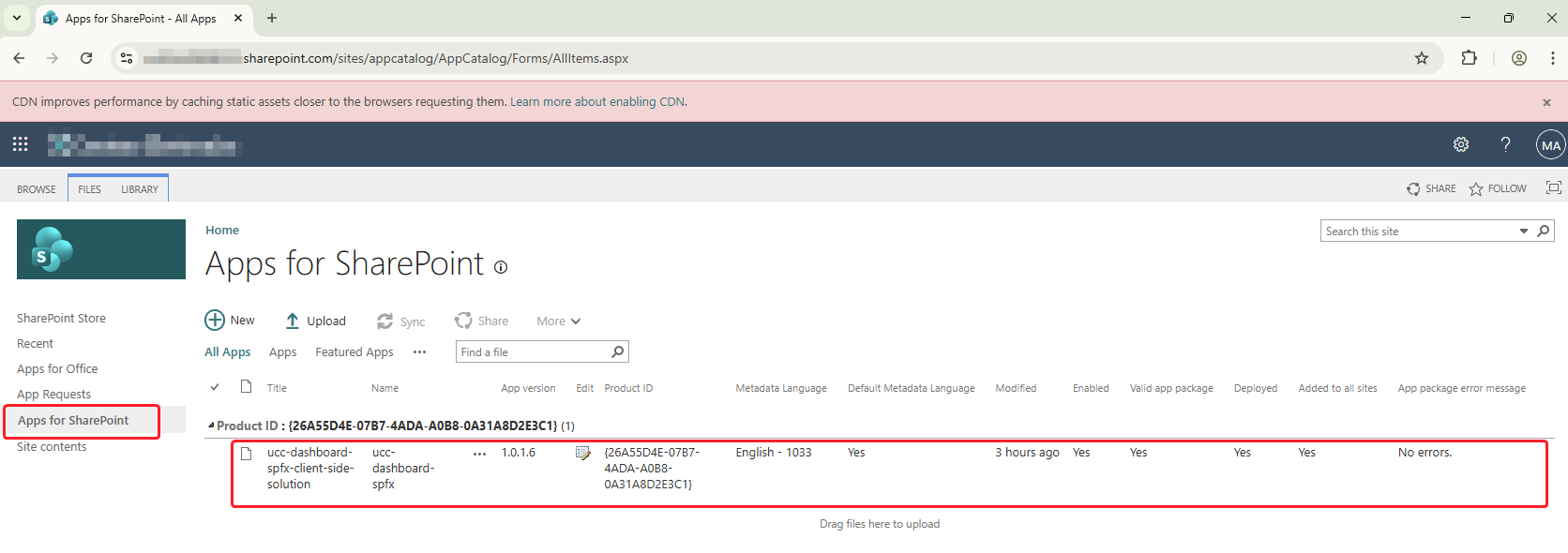
The `Deploy-UccDashboard.ps1` script deploys the UCC Dashboard SPFx package to your tenant's app catalog. This is a **one-time setup** that makes the UCC Dashboard web part available to all SharePoint sites in your tenant.
For the standard deployment path, run this against the tenant app catalog before you create the first UCC site. Use the site collection app catalog variant only when you are intentionally following the reduced-permissions [`Sites.Selected`](/set-up-dialogue-cloud-neo/prerequisites/configure-sharepoint-sites/sites-selected-permissions.md) exception path.
{% hint style="success" %}
**Before you begin:** Complete the [Prerequisites](/set-up-dialogue-cloud-neo/prerequisites/configure-sharepoint-sites.md#prerequisites) — PowerShell 7.4.6 or higher, an Entra ID app registration with `Sites.FullControl.All` granted, and a certificate (`.pfx`) associated with the app.
{% endhint %}
***
## When to run this script
* **Once per tenant** — run this before creating your first UCC site.
* **After package updates** — run with `-Force` when upgrading to a new version of the UCC Site Creator package.
***
## Basic usage
### Certificate authentication (recommended)
```powershell
$certPassword = Read-Host -AsSecureString -Prompt "Enter certificate password"
.\Deploy-UccDashboard.ps1 `
-TenantUrl "https://contoso.sharepoint.com" `
-ClientId "your-client-id" `
-CertificatePath "C:\Certs\cert.pfx" `
-CertificatePassword $certPassword
```
### Interactive authentication
Use interactive authentication only when your environment explicitly allows that operator-run variant. The standard new-deployment path for this section remains App-Only certificate authentication.
```powershell
.\Deploy-UccDashboard.ps1 `
-TenantUrl "https://contoso.sharepoint.com" `
-Interactive `
-ClientId "your-client-id"
```
***
## Parameters
| Parameter | Required | Description |
| ------------------------------ | -------- | ------------------------------------------------------------------------------------------------------------------------------------------------------------------------------------------------------------------------------------------------------------------ |
| `-TenantUrl` | Yes | Your SharePoint tenant root URL (for example, `https://contoso.sharepoint.com`) |
| `-ClientId` | Yes | Entra ID application (client) ID |
| `-CertificatePath` | No\* | Path to the `.pfx` certificate file |
| `-CertificatePassword` | No\* | Certificate password as `SecureString` |
| `-Interactive` | No\* | Use browser-based authentication instead of certificate |
| `-Force` | No | Re-deploy even if already deployed — use when upgrading the package |
| `-SkipTenantWide` | No | Deploy without tenant-wide availability. If used, the UCC Dashboard web part is not automatically available and must be installed manually on each SharePoint site. Use only if organizational governance prohibits tenant-wide SPFx deployments. Not recommended. |
| `-UseSiteCollectionAppCatalog` | No | Deploy to a site collection app catalog instead of the tenant app catalog. Available since v8.4.1.9. |
| `-SiteCollectionAppCatalogUrl` | No\*\* | Site collection URL used by the reduced-permissions `Sites.Selected` exception path when `-UseSiteCollectionAppCatalog` is used. |
\*Either `-Interactive` or certificate parameters (`-CertificatePath` and `-CertificatePassword`) are required.
\*\*Required only for the reduced-permissions `Sites.Selected` exception path. Do not use this parameter for the standard tenant-app-catalog deployment path.
***
## What the script does
1. Connects to your SharePoint tenant admin center.
2. Locates the tenant app catalog site.
3. Temporarily enables scripting on the app catalog.
4. Uploads `ucc-dashboard-spfx.sppkg` to the app catalog.
5. Deploys the package tenant-wide, making the UCC Dashboard web part automatically available to all sites without per-site installation.
6. Creates a `.tenant-setup-complete` marker file to track deployment status.
***
## Expected output
A successful deployment ends with:
```
============================================================
Tenant Setup Complete!
============================================================
The SPFx package has been deployed to your tenant App Catalog.
The solution is available TENANT-WIDE, which means:
- No need to install the app on each site
- The UCC Dashboard web part is automatically available
```
***
## Tenant-wide vs site collection app catalog
By default, the script deploys tenant-wide. This is the recommended approach for most deployments.
If your organization requires deployment to a site collection app catalog instead, use `-UseSiteCollectionAppCatalog` together with `-SiteCollectionAppCatalogUrl`. The dashboard is then installed per site collection only. This option is available since UCC Site Creator v8.4.1.9 and belongs only to the reduced-permissions `Sites.Selected` exception path.
## Readiness checks
Before you continue to site creation, confirm all of the following:
1. The script ended with the expected tenant-setup completion message.
2. The UCC Dashboard package is deployed to the intended app catalog.
3. The deployment model matches the chosen path:
* tenant-wide deployment for the standard path
* site collection app catalog only for the reduced-permissions `Sites.Selected` path
4. The target environment can expose the UCC Dashboard web part to the sites that will use it.
***
## What's next?
After deployment completes, proceed to [Create UCC Site](/set-up-dialogue-cloud-neo/prerequisites/configure-sharepoint-sites/create-ucc-site.md).
---
# Agent Instructions
This documentation is published with GitBook. GitBook is the documentation platform designed so that both humans and AI agents can read, navigate, and reason over technical content effectively. Learn more at gitbook.com.
## Querying This Documentation
If you need additional information that is not directly available in this page, you can query the documentation by asking a question.
Perform an HTTP GET request on the following URL with the `ask` and `goal` query parameters:
```
GET https://atlas.anywhere.now/set-up-dialogue-cloud-neo/prerequisites/configure-sharepoint-sites/deploy-ucc-dashboard.md?ask=&goal=
```
`ask` is the immediate question: it should be specific, self-contained, and written in natural language.
`goal` is what the user is ultimately trying to achieve, the reason they need the answer. Sharing it helps GitBook give you a better, more relevant answer. A goal is most helpful when it describes the outcome the user wants rather than restating the question. For example, with `ask=how do I create an API token`, a goal like `automate deployments from our CI pipeline` lets GitBook tailor the answer to that use case.
The response will contain a direct answer to the question and relevant excerpts and sources from the documentation.
Use this mechanism when the answer is not explicitly present in the current page, you need clarification or additional context, or you want to retrieve related documentation sections.