> For the complete documentation index, see [llms.txt](https://atlas.anywhere.now/llms.txt). Markdown versions of documentation pages are available by appending `.md` to page URLs; this page is available as [Markdown](https://atlas.anywhere.now/attendant-console/shared-components/azure-communication-services.md).
# Azure Communication Services
Configure Azure Communication Services call handling for Attendant Console.
Azure Communication Services (ACS) lets operators handle Attendant Console calls in the browser instead of relying on the Microsoft Teams desktop client for Attendant Console call acceptance. ACS is the current and preferred call-handling path for the one-click acceptance experience previously supported by Desktop Integrator.
{% hint style="warning" %}
ACS and Desktop Integrator are mutually exclusive. Deselect Desktop Integrator before selecting ACS, and do not enable both for the same operator workflow.
{% endhint %}
## Required permissions
An administrator who can grant organization-wide Microsoft Entra ID consent is required for the product-specific consent step.
## Consent URLs
Use the consent URL for the customer's Attendant Console track.
| Product | Consent URL |
| ------------------------------------- | ------------------------------------------------------------------------------------------------------------------------------------------------------------- |
| Attendant Console for Microsoft Teams | `https://login.microsoftonline.com/common/adminconsent?client_id=a7bdb4c6-23d0-4e4a-958a-168b50d67465&redirect_uri=https%3A%2F%2Fattendant.anywhere365.io%2F` |
| Attendant Console for Dialogue Cloud | `https://login.microsoftonline.com/common/adminconsent?client_id=b49e1919-ca4f-4a60-bae4-24bb7b231f97&redirect_uri=https://dr-attendant.anywhere365.io/` |
## Connection string options
Attendant Console can use a default ACS connection string or a customer-owned ACS connection string, depending on the product track and customer configuration.
* For Attendant Console for Dialogue Cloud, the default ACS connection string is included where this option applies.
* If the customer configures a customer-owned ACS connection string, Azure Communication Services usage may create additional per-minute Azure charges. Check current Microsoft Azure Communication Services pricing before estimating costs.
* Do not use a historical exact EUR per-minute value as an authoritative price.
A connection string starts with `endpoint=`, followed by the ACS endpoint URL, a semicolon, and an access key.
## Configure a customer-owned connection string
1. Open the Attendant Console administration settings for ACS.
2. Clear **Use default ACS connection string**.
3. Paste the customer-owned ACS connection string.
4. Select **Test**.
5. Confirm the test succeeds.
6. Select **Save**.
ACS settings for Attendant Console call handling.
Successful ACS connection string test.
## Operator behavior after ACS is enabled
* Attendant Console handles Attendant Console calls in the browser.
* Computer audio settings determine the conversation audio device.
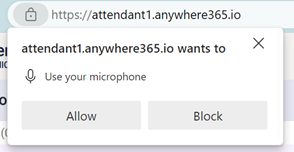
* On first use, the browser asks the operator to allow microphone access.
* The ringer and conversation audio use the same device unless the operator configures an alternative audio output for alerts in **Preferences**.
* Microsoft Teams remains available for personal calls, chat, meetings, and other native Microsoft Teams functionality.
* When an operator accepts a queue call, Microsoft Teams may also ring or show a toast. Operators should ignore the Microsoft Teams toast when the call is already active in Attendant Console.
* Microsoft Teams presence is set to **Busy on a Call** while the operator handles a call in Attendant Console. Manual presence overrides can affect this behavior.
## Browser recommendation
Running Attendant Console with ACS inside Microsoft Teams is possible, but the source warns that moving focus away from the embedded app during a conversation can stop audio or lose the conversation. Use Attendant Console as a browser app when ACS is the call-handling path.
## Network requirements
Review Microsoft's ACS network requirements before enabling ACS for production users:
{% embed url="" %}
---
# Agent Instructions
This documentation is published with GitBook. GitBook is the documentation platform designed so that both humans and AI agents can read, navigate, and reason over technical content effectively. Learn more at gitbook.com.
## Querying This Documentation
If you need additional information that is not directly available in this page, you can query the documentation by asking a question.
Perform an HTTP GET request on the following URL with the `ask` and `goal` query parameters:
```
GET https://atlas.anywhere.now/attendant-console/shared-components/azure-communication-services.md?ask=&goal=
```
`ask` is the immediate question: it should be specific, self-contained, and written in natural language.
`goal` is what the user is ultimately trying to achieve, the reason they need the answer. Sharing it helps GitBook give you a better, more relevant answer. A goal is most helpful when it describes the outcome the user wants rather than restating the question. For example, with `ask=how do I create an API token`, a goal like `automate deployments from our CI pipeline` lets GitBook tailor the answer to that use case.
The response will contain a direct answer to the question and relevant excerpts and sources from the documentation.
Use this mechanism when the answer is not explicitly present in the current page, you need clarification or additional context, or you want to retrieve related documentation sections.