> For the complete documentation index, see [llms.txt](https://atlas.anywhere.now/llms.txt). Markdown versions of documentation pages are available by appending `.md` to page URLs; this page is available as [Markdown](https://atlas.anywhere.now/attendant-console/set-up-and-administer-1/setup-and-consent.md).
# Set up Attendant Console for Microsoft Teams
Grant tenant consent and prepare prerequisites for existing Attendant Console for Microsoft Teams deployments.
{% hint style="warning" %}
Attendant Console for Microsoft Teams is existing-customer support documentation. Do not use this page as a new-customer acquisition or onboarding path.
{% endhint %}
Use this page to grant organization consent and prepare the Microsoft Teams tenant for an existing Attendant Console for Microsoft Teams deployment.
## Required permissions
A Microsoft 365 global administrator is required for the consent steps. PowerShell workaround steps require permission to create a Microsoft Entra ID service principal.
## Prerequisites by calling architecture
| Architecture | Required items |
| ---------------------- | ---------------------------------------------------------------------------------------------------------------------------------------------------- |
| Microsoft Calling Plan | One Microsoft Teams Phone Resource Account license per queue; one Microsoft call queue phone number per queue; a Microsoft 365 tenant administrator. |
| Direct Routing | One Microsoft Teams Phone Resource Account license per queue; one phone number from the dial plan per queue; a Microsoft 365 tenant administrator. |
| Operator Connect | One Microsoft Teams Phone Resource Account license per queue; one Microsoft call queue phone number per queue; a Microsoft 365 tenant administrator. |
{% hint style="info" %}
For outbound calling with Microsoft Calling Plan, assign the **Microsoft 365 Domestic and International Calling Plan** license to the resource account created for the Attendant Console queue.
{% endhint %}
## Setup flow
1. Grant consent for the Attendant Console application.
2. Grant consent for the regional calling bot.
3. Create Attendant Console queues.
4. Optionally deploy the Attendant Console Microsoft Teams app manifest, or instruct operators to use the browser.
High-level service map for Attendant Console for Microsoft Teams.
## Temporary ACS service principal requirement
During consent, the application requests a shared permission set that includes Azure Communication Services. If the ACS service principal is not present in the tenant, Microsoft Entra ID can stop the consent flow before the consent screen appears.
Global AppId:
```
1fd5118e-2576-4263-8130-9503064c837a
```
The consent failure can include:
```
AADSTS650052: The app is trying to access Azure Communication Services but your tenant lacks a service principal
```
This is a known product limitation, not a customer configuration error. Creating the service principal does not deploy ACS resources, does not require an active Azure subscription, and does not introduce ACS usage costs.
### Create the service principal
```powershell
Connect-MgGraph -Scopes "Application.ReadWrite.All", "Directory.ReadWrite.All"
New-MgServicePrincipal -AppId "1fd5118e-2576-4263-8130-9503064c837a"
```
Optional verification:
```powershell
Get-MgServicePrincipal -Filter "AppId eq '1fd5118e-2576-4263-8130-9503064c837a'"
```
After the service principal exists, run the consent URL again and confirm that the consent screen appears.
## Consent URLs
### Attendant Console application
```
https://login.microsoftonline.com/common/adminconsent?client_id=a7bdb4c6-23d0-4e4a-958a-168b50d67465&state=teamsbot&redirect_uri=https%3A%2F%2Fattendant.anywhere365.io%2F
```
After consent, the administrator is redirected to the Attendant Console page. It is not necessary to sign in before continuing with the next consent step.
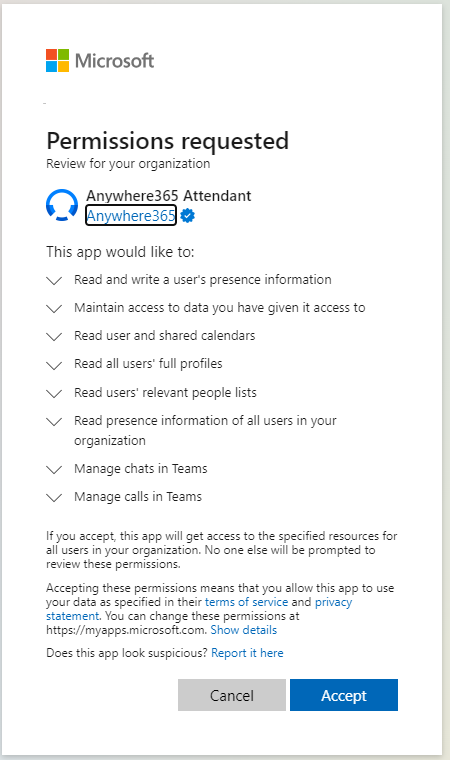
Permissions requested by the Attendant Console application.
### Regional calling bot
Select the region used by the customer's Attendant Console queue deployment.
| Region | Consent URL |
| ------ | ------------------------------------------------------------------------------------------------------------------------------------------------------------------------------------------------ |
| EMEA | `https://login.microsoftonline.com/common/adminconsent?client_id=01b9161a-881b-4ab0-8ee2-15e9141e95c6&state=teamsbot&redirect_uri=https%3A%2F%2Fattendant1.anywhere365.io%2Fportal%2Fconnectors` |
| AMER | `https://login.microsoftonline.com/common/adminconsent?client_id=23ab1d0b-1447-4f30-b374-5520bc715f98&state=teamsbot&redirect_uri=https%3A%2F%2Fattendant2.anywhere365.io%2Fportal%2Fconnectors` |
| APAC | `https://login.microsoftonline.com/common/adminconsent?client_id=9bbab3e5-d1ea-40de-be7d-0bf5697f4b5d&state=teamsbot&redirect_uri=https%3A%2F%2Fattendant3.anywhere365.io%2Fportal%2Fconnectors` |
Example regional calling bot consent prompt.
## Next steps
{% content-ref url="/pages/RiQNBvWxOlHELx9EabR2" %}
[Create Attendant Console for Microsoft Teams queues](/attendant-console/set-up-and-administer-1/create-queues.md)
{% endcontent-ref %}
{% content-ref url="/pages/SrwJOja4mtQW3ZGj051H" %}
[Deploy as a Microsoft Teams app](/attendant-console/shared-components/deploy-teams-app-manifest.md)
{% endcontent-ref %}
---
# Agent Instructions
This documentation is published with GitBook. GitBook is the documentation platform designed so that both humans and AI agents can read, navigate, and reason over technical content effectively. Learn more at gitbook.com.
## Querying This Documentation
If you need additional information that is not directly available in this page, you can query the documentation by asking a question.
Perform an HTTP GET request on the following URL with the `ask` and `goal` query parameters:
```
GET https://atlas.anywhere.now/attendant-console/set-up-and-administer-1/setup-and-consent.md?ask=&goal=
```
`ask` is the immediate question: it should be specific, self-contained, and written in natural language.
`goal` is what the user is ultimately trying to achieve, the reason they need the answer. Sharing it helps GitBook give you a better, more relevant answer. A goal is most helpful when it describes the outcome the user wants rather than restating the question. For example, with `ask=how do I create an API token`, a goal like `automate deployments from our CI pipeline` lets GitBook tailor the answer to that use case.
The response will contain a direct answer to the question and relevant excerpts and sources from the documentation.
Use this mechanism when the answer is not explicitly present in the current page, you need clarification or additional context, or you want to retrieve related documentation sections.